Coercing AI Compliance: Structural Rails for Consistent Multi-View Architectural Visualization
Semantic masks + site LoRAs + dual ControlNet + SAM: a complete blueprint for coercing Diffusion Model outputs to your BIM data across every viewpoint.

By Axoworks Technical Review | June 2026
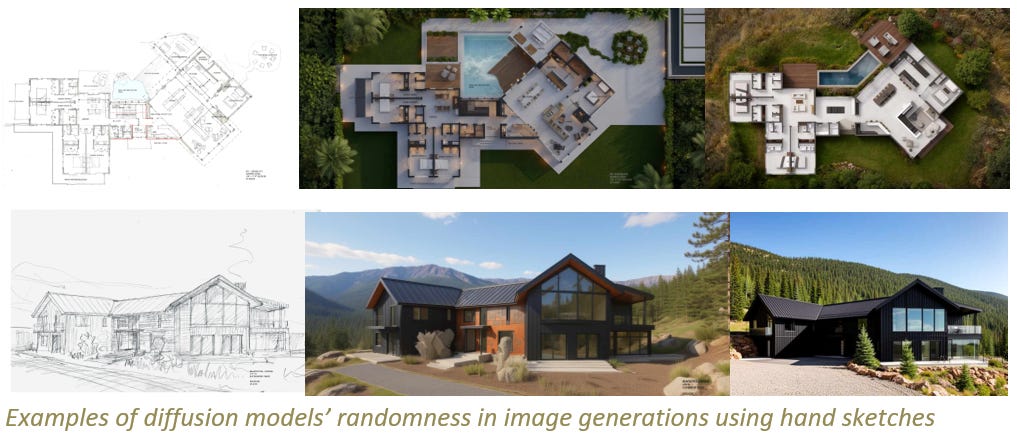
A West Coast Architect approached Axoworks to produce a visualization package for a luxury mountain lodge in a high-altitude ski resort region. The only design artifacts on hand were hand sketches and a material palette. No BIM model. No 3D geometry. Just pencil on paper, capturing the architect’s intent for a timber-and-stone retreat against a mountain backdrop.
The brief was specific: four exterior views for a client design-review package, each render photorealistic, materials consistent across all frames, and the landscape unmistakably that place.
The challenge was not merely visualizing the design. It was creating a controlled, consistent visual system that could produce reliable, multi-viewpoint output from a fundamentally probabilistic generative AI—all within a deadline that left no room for endless iteration.
The Paradox of Probabilistic Design
This is the central tension of generative AI in architectural visualization: design is intentional, but diffusion is probabilistic.
Every sampling step introduces variance. A diffusion model has no native concept of a “material schedule,” no BIM data, and no embedded geometry. It has only the prompt, the conditioning stack, and the latent space—and even the most precise prompt is a request, not a contract.
At Axoworks, we have been developing a methodology we call “coercing AI compliance”—building structural rails that constrain and guide probabilistic behavior toward consistent, controllable output. The technique combines:
Semantic color-coding
Site-specific LoRA training
Geometry-aware conditioning via ControlNet
Iterative refinements with segmentation models
What follows is the exact pipeline we used to produce the mountain lodge client package—a workflow that generated four viewpoint-consistent, material-accurate, site-authentic exterior renders against a deadline that demanded precision under pressure.
The Challenge: Forty Hours, Hand Sketches, and No Model
The client had authorized a forty-hour budget. The architect’s concept was conveyed through hand sketches—expressive, spatially intelligent, but lacking the geometric precision required for traditional rendering.
In a conventional workflow, the process looks like this:
Build a detailed BIM model in Revit.
Export to a rendering engine.
Set up lighting, materials, entourage, and post-production.
That BIM model pipeline alone consumed the first 39 hours of the budget. Conventional rendering at that stage would have been generic—technically correct, but lacking the emotive, site-specific quality the client needed. On the other hand, an unstructured generative approach would have produced inconsistent materials, drifting geometry, and a landscape that averaged every mountain the model had ever seen.
We made a critical decision: use the BIM model not as a rendering source, but as a conditioning source.
The model was built quickly in Revit—just enough to capture massing, material zones, and camera angles. It was not construction-documentation grade ; it was visualization-grade, optimized solely to serve as the geometric and material backbone that would constrain the AI into compliance.
By the time the architect had reviewed the BIM model, provided input on massing adjustments, and revisions had been made to reconcile unexpected geometry discovered during sketch-to-digital translation, 39 hours had elapsed. There was zero time left for conventional rendering, lighting setup, or material tuning.
The AI pipeline was not a convenience ; it was a necessity. We absorbed an additional 47 hours for LoRA training, pipeline construction, and iterative inference—time invested beyond the client budget to prove the methodology and deliver the vision.
The Pipeline: Structural Rails for Consistent Output
The workflow was built on a simple principle: AI does not need to be tamed. It needs to be conditioned. We constructed four layers of structural rails that together transformed a probabilistic engine into a consistent, controllable rendering substrate.
Layer 1: Semantic Color-Coding in Revit — The Spatial Contract
The breakthrough came from the BIM side. In Revit, we created a dedicated visualization view template—not for rendering, but for conditioning. Every material zone in the model was assigned a high-contrast, non-photorealistic color. These colors were chosen strictly for semantic clarity and machine readability.
COLOR / MATERIAL / PURPOSE
Yellow/ Stone (base, chimney, retaining walls) / Anchors the building to the terrain
Red / Vertical Wood Siding / Primary facade material
Gray / Horizontal Wood Siding / Secondary facade material
Green / Trims-Fascia / Edge conditions and accent lines
Magenta / Concrete / Hardscape and surrounding context
These color-coded views were exported from Revit as high-resolution images mapping the front elevation, approach perspective, rear courtyard, and side garage angle. In each export, the building appeared as a wireframe of flat, high-contrast colored zones with no shading or texture.
To a human eye, these looked like abstract diagrams. To the diffusion model’s conditioning pipeline, they were spatial contracts.
The semantic color map operates as a segmentation mask fed into the conditioning pipeline. When passed through the appropriate conditioning nodes, the model receives strong spatial guidance that yellow equals stone, red equals siding A, and gray equals siding B. The model retains creative latitude to interpret the “stone”—its grain pattern, color variation, and weathering—but the structural rails strongly discourage placing timber in the yellow zone or stone in the red zone.
The geometry is anchored, the material boundaries are heavily influenced, and the AI is structurally constrained. By exporting multiple viewpoints using this exact same color scheme, we ensured that the spatial contract remained consistent across all camera angles. The front view’s red zone corresponded directly to the approach view’s red zone , forming the foundation of a controlled pipeline.

Layer 2: Site-Specific LoRA Training — Learning the Chromatic Character of Place
If the color map provides spatial consistency, the LoRA provides aesthetic coherence. A standard generative model trained on broad internet imagery will produce a “mountain landscape” that averages every mountain it has ever seen. The specific vegetation, the exact color of a late-summer meadow, and the crisp quality of high-altitude light all risk being lost in the statistical wash.
We needed the model to generate that specific place, not a generic “mountain.” This required training a Low-Rank Adaptation (LoRA) on actual site photography.
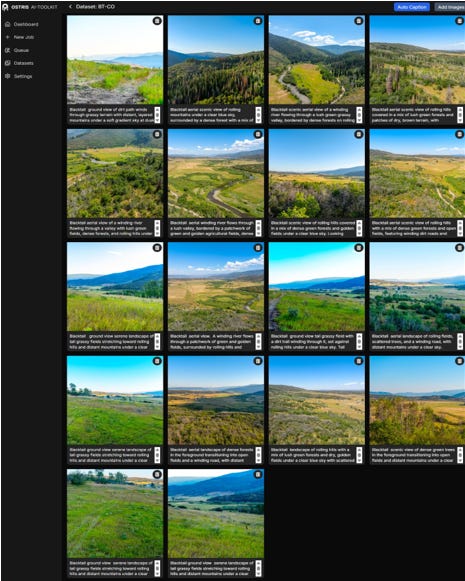
Our training dataset comprised captioned drone images captured by a local photographer. The captions were geographically and atmospherically specific:
“aerial scenic view of rolling mountains under a clear blue sky”
“ground view of tall grassy field with distant layered mountains”
“aerial drone view of high-altitude ski resort terrain”
Training was performed using a lightweight LoRA training framework optimized for small datasets. The base model featured a modern diffusion architecture with an advanced text encoder providing substantially improved prompt comprehension compared to earlier generations. This is critical for architectural visualization: precise spatial and material terminology must be interpreted accurately, not mangled into generic associations.
Training Parameters
Optimizer: Memory-efficient 8-bit AdamW
Training Steps: 2,000 steps
Learning Rate: 0.0001 ($1\times10^{-4}$)
LoRA Rank: Standard rank configuration for style adaptation
Dataset: Captioned drone images with automatic captioning and manual refinement
The resulting LoRA weights encoded a site-specific aesthetic signature—the tonal range of the native meadow grasses, the exact quality of the sky at elevation, and the particular way afternoon light moves across the rolling topography.
When injected into the diffusion pipeline at the model level, the LoRA does not dictate composition; it dictates atmosphere. It ensures that when the model generates the landscape behind the building, it generates the actual landscape of the site, establishing the difference between “AI-generated imagery” and “AI-generated place.”
Layer 3: ControlNet Conditioning — Locking the Form with Canny and Depth
Color maps and LoRAs provide material and atmospheric anchors, but they do not fully constrain geometry. A diffusion model can still drift massing proportions, elongate rooflines, or hallucinate structural elements. To lock the architectural form across all viewpoints, we integrated ControlNet—a neural network conditioning framework that uses spatial guidance maps to enforce geometric fidelity.
Two ControlNet passes were critical to our execution:
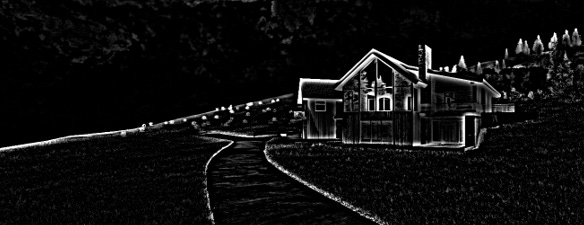
Canny Edge Conditioning: The Canny edge detector produces a line-drawing map from the Revit viewport export, capturing the hard edges of the building—rooflines, window mullions, corners, and material transitions. When fed into the ControlNet Canny model, this edge map acts as a geometric skeleton, guiding the diffusion model to place its generated features strictly within the boundary lines. The roofline is anchored, the window grid is stabilized, and transitions occur exactly where the Revit model specifies
Depth Map Conditioning: The depth map encodes the spatial relationship between foreground, midground, and background. Darker values represent closer surfaces; lighter values represent distant ones. The ControlNet Depth model uses this map to enforce correct spatial hierarchy: the garage wing sits clearly in front of the main volume, the stone base reads as a foundation rather than a floating element, and the landscape recedes correctly into the mountain backdrop.
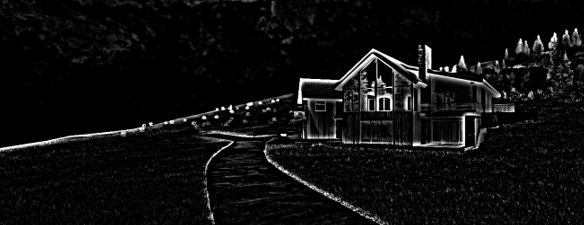

Together, Canny and Depth ControlNet create a geometric cage around the diffusion process. The color map says what goes where ; the LoRA says how it should look ; the ControlNet says what shape it must be. These systems operate simultaneously, each constraining a different dimension of the output.

Layer 4: SAM Corrections — Segment Anything for Detailed Cleanup
Even with triple conditioning, generative AI produces artifacts: a window frame might bleed into stone, a roofline might develop an unexpected shadow, or vegetation might intrude into the building envelope. These are the inherent noise of the diffusion process, statistically unlikely but practically inevitable across a large output set.
For detailed cleanup, we deployed SAM (Segment Anything Model)—a segmentation model capable of isolating arbitrary regions in an image based on point or box prompts. SAM does not generate pixels; it identifies boundaries. We utilized it in two distinct ways:
Region Isolation for Targeted Regeneration: When an artifact appeared, a point prompt on the error produced a precise mask boundary. That mask defined an inpainting region where the diffusion model regenerated only the masked area, holding surrounding pixels constant. This preserved the overall composition while correcting local errors without requiring a full re-render.
Material Boundary Verification: SAM served as our automated quality-check tool. By prompting on material boundaries (e.g., the edge where stone meets timber), we verified that the generated image respected the color-map conditioning. If SAM’s segmentation boundary aligned with the Revit export boundary, the conditioning was verified as successful.
The SAM correction layer added a crucial human-in-the-loop refinement step, auditing and repairing the structural rails at the pixel level to ensure deliverable quality.
The Hardware: Compute Requirements
This pipeline is computationally heavy. The simultaneous loading of a full-scale diffusion model, a custom LoRA, two ControlNet conditioning networks, and the SAM segmentation model pushes consumer hardware well beyond standard limits.
The workstation that executed this pipeline utilized a high-tier enterprise configuration:
GPU: NVIDIA RTX 6000 Blackwell (96 GB VRAM)
CPU: Intel Core i9 (Latest Generation)
System RAM: 96 GB DDR5
During peak generation, the system reported VRAM utilization consistently above 90% and system RAM utilization near 90%. The GPU was heavily saturated, while the CPU managed data orchestration, memory paging, and high-resolution I/O.
Technical Note on Accessibility: This hardware configuration was our enabling factor, not an absolute industry minimum. The workflow can be adapted for lower-VRAM hardware through model quantization, tiled VAE decoding, sequential ControlNet loading, CPU offloading of SAM, and lower-resolution generation followed by upscaling.
However, for an accelerated client deadline, this 96 GB configuration eliminated the bottleneck of constant model swapping, keeping the entire pipeline resident in memory. Because inference time per image was measured in minutes, this robust hardware setup was the exact asset that made the expanded scope achievable within our timeframe.
The Execution: Node-Based Orchestration & Testing
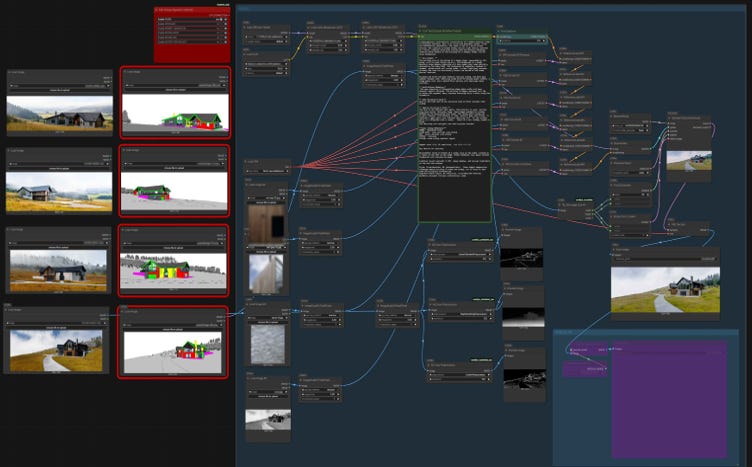
The execution environment was managed entirely within a node-based visual interface for diffusion workflows. This environment allowed us to feed multiple control signals into the denoising process at once, modulating different layers of the network simultaneously.
The workflow graph for each of the four views was mapped as follows:
Model Loading & LoRA Injection: Loaded the base model and injected the custom LoRA weights at the pipeline level to maintain stylistic adaptation throughout the entire denoising process.
Color Map Conditioning: Loaded the semantic color-coded Revit export, encoding spatial material data directly into the cross-attention layers.
ControlNet Conditioning: Passed the Canny edge map and Depth map into separate ControlNet nodes, feeding geometric constraints into different levels of the network.
Text Prompt Conditioning: Appended the text prompt to provide atmospheric direction: “Photorealistic architectural visualization, late afternoon mountain light, high-altitude sky, warm timber, rough-hewn stone, native meadow, distant mountain peaks, 8k detail, cinematic composition.”
Denoising & Decode: Ran the process through a sampler node with optimized step counts and guidance scales, then decoded the latents into the final pixel image.
We tested multiple model architectures during this phase. While smaller distilled models offered fast iteration during early schematic phases, the full-scale model was required for final deliverables to preserve material boundaries with the highest fidelity.
The key takeaway for implementation: model versioning matters. LoRAs trained on one architecture cannot be trivially transferred to another; your conditioning pipeline must be tightly matched to its corresponding model family.
Results: Consistent Photorealistic Renders
The final output yielded four photorealistic exterior renders that achieved a level of material and spatial consistency completely impossible through text prompt engineering alone.
Front Elevation: The main timber volume rose cleanly from the stone base. The glazing band read as actual glass with subtle sky reflections, cutting a sharp silhouette against the mountain backdrop. The stone read as dark, rough-hewn local granite, while the timber showed the warm, weathered brown-gray tones of high-altitude cedar. The landscape perfectly captured the golden-green of late-summer native grasses documented by the drone photography.
Approach Perspective: Looking from the garage wing in the foreground to the main volume beyond, the stone wrapping the garage corner and the timber cladding matched the main volume exactly. The landscape remained the same continuous meadow rather than a drifting “mountain background.”
Rear Courtyard: The glazed entry bridge maintained transparency, showing interior light spilling outward. The stone base and timber cladding continued seamlessly from the front views, opening out to the same native meadow with matching vegetation density.
Side Garage Angle: This close-up view focused heavily on the material transitions where the stone base wraps the corner and the timber begins at the precise floor-line. The pipeline delivered identical stone grain, identical timber color, and identical glazing behavior, holding up perfectly under close scrutiny.
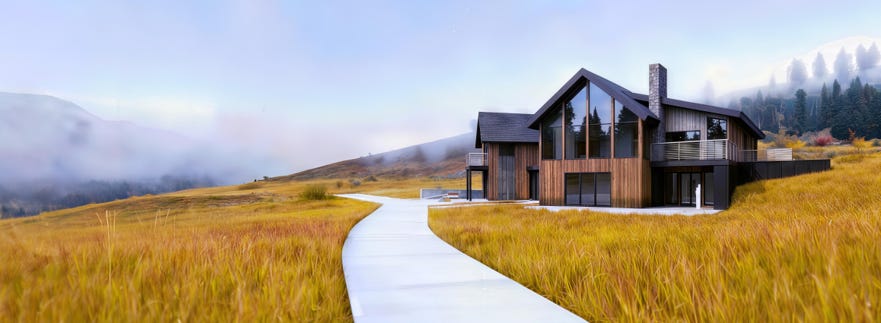
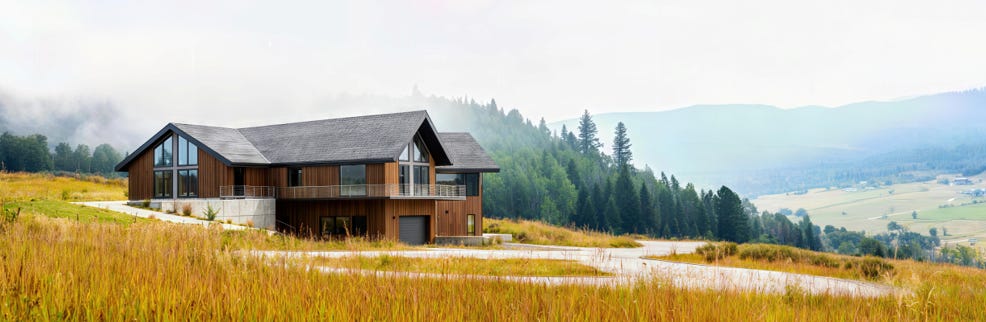
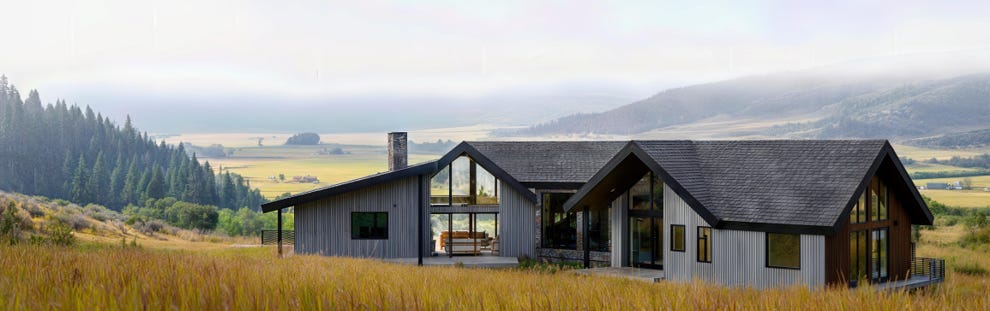
Verification was straightforward: a side-by-side comparison of the color-mapped regions across all views confirmed that the red zone mapped to stone, the yellow zone mapped to timber, the cyan zone to glazing, and the magenta zone to native landscape in every single frame. The AI had complied—not because it was asked nicely, but because it was structurally constrained.
Broader Implications: A New Paradigm for AEC Workflows
This pipeline is a prototype of a new paradigm already emerging in architectural practice: the integration of generative AI into controlled, deterministic BIM-to-deliverable workflows.
The New Pipeline: Ideate, Refine, Deliver
Industry workflows are rapidly converging into three distinct phases:
Ideate in AI: Generate rapid conceptual and schematic visualizations.
Refine in Real-Time: Use tools like Enscape, Twinmotion, or D5 Render to lock geometry and materials in a real-time environment.
Deliver in Ray-Tracing: Use path-traced renderers like V-Ray or Corona for physically accurate, final presentation images.
What our workflow demonstrates is that the AI phase is no longer a wild card. With proper conditioning, it produces outputs consistent enough to feed directly into real-time refinement without losing material consistency or spatial accuracy, bridging the gap between probabilistic ideation and controlled production.
For BIM Managers: Standardize AI View Templates
The immediate takeaway for design technologists is procedural: standardize semantic color-coding as an internal view template. Just as Revit maintains templates for standard construction documentation graphics , practices should develop an AI Conditioning View Template that assigns high-contrast, semantically consistent colors to material classes.
This template becomes a standardized project milestone asset. The color map is no longer a rendering artifact; it is clean data—a lightweight, pixel-encoded material schedule that transforms the BIM model into the definitive conditioning engine for the AI.
Hardware as a Strategic Asset
The computing infrastructure required for this pipeline is not a temporary hurdle. As conditioning stacks grow more complex—incorporating multiple ControlNets, simultaneous LoRAs, real-time segmentation, and video generation—compute demands will scale upwards. For firms adopting advanced visualization, workstation infrastructure is becoming as critical as software licensing; the line between the IT budget and the design tool budget is officially blurring.
Conclusion: The Future Is Conditioned by Intention
The model is not the product. The model is the engine. The product is the conditioning—the system of constraints, data, and intention that guides the engine to produce what the designer needs, not what the model statistically prefers.
Probabilistic AI will always sample from latent space, and its creative power remains inseparable from its variability. But because uncontrolled variability is unacceptable for professional deliverables, the solution is to build structural rails so robust that the output lands exactly where you need it, every single time.
By combining Semantic Color Maps , Site-Specific LoRAs , ControlNet Conditioning , and SAM Corrections on professional enterprise hardware, the technologist’s rig ensures the AI does not guess. It executes.
The future is not a prompt. It is a pipeline.
Build the rails. Coerce the compliance. Deliver the vision.
Technical Appendix: Hardware and Compute Profile
GPU: NVIDIA RTX 6000 Blackwell, 96 GB VRAM
CPU: Intel Core i9 (Latest Generation)
System RAM: 96 GB DDR5
Peak VRAM/System RAM Utilization: 90%+ during full pipeline execution
Pipeline Components: Base diffusion model + custom LoRA + dual ControlNet (Canny + Depth) + SAM segmentation + node-based orchestration
Total Conditioning Mechanisms: 3 simultaneous conditioning inputs (color map, Canny ControlNet, Depth ControlNet) + 1 model-level adaptation (LoRA)
Output Resolution: High-resolution architectural visualization (4K+ per view)
This article was produced by Axoworks for architecture professionals, BIM managers, design technologists, and visualization specialists exploring generative AI in controlled design workflows. The pipeline described is a real project executed under an accelerated client deadline. All technical specifications, hardware configurations, and workflow parameters are documented as implemented. Identities and specific geographic locations have been anonymized at the client’s request.